
Quick facts
- Best for
- Image editing
- Pricing
- Freemium
- Editor rating
- 4.7 / 5
- Community saves
- 0
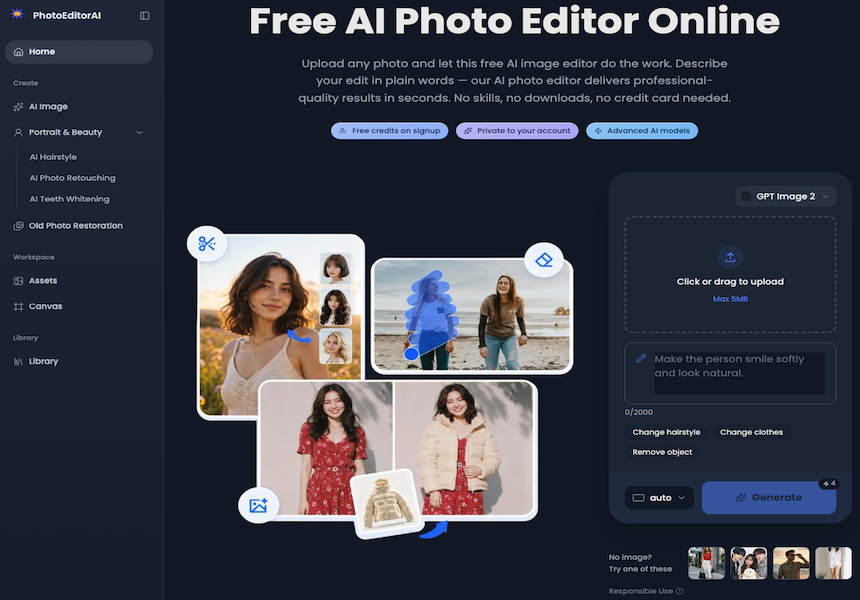
About PhotoEditorAI
Photo Editor AI is an online application powered by most advanced artificial intelligence to enhance and edit photos. The tool allows users to generate images, change hairstyles, retouch portraits, whiten teeth, and restore old photos. The edits are rendered through an advanced automatic process where users simply describe in plain English the changes they desire. User-friendly features remain consistent even during edits such as changing outfits, swapping backgrounds, or introducing new poses, ensuring the subject's identity and features are preserved. The tool provides pixel-level precision editing enabling users to target specific regions like eyes, skin textures, sky gradients, or logos with accuracy. It seamlessly blends text into images, giving a natural feel to captions, logos, and watermarks. With creative style transfer capabilities, the program can reproduce the style of a reference image onto the user's photo. It offers AI Image Generation, Hairstyle Changing, Teeth Whitening, Photo Retouching, and Old Photo Restoration services. The tool is beneficial to personal and commercial users alike because anyone can employ it for diverse uses like social media graphics, e-commerce product banners, promotional posters, or personal images. Its 'plug and play' style makes it accessible, requiring no credit card information or previous editing skills. Key FeaturesInfinite Content GenerationInfinite Canvas
Pros
- Free-to-start
- No credit card required
- Changes hairstyles
- Retouches portraits
- Whitens teeth
- Restores old photos
- Advanced targeted editing
- Style transfer feature
- Generates images from descriptions
- Works on any device
- Editing with plain English
- Preserves subject's identity
Cons
- No photo import from social media
- Limited file types support
- No batch editing
- No direct social media publishing
- No collaborative editing
- No organisation or cataloguing system
- No color matching tool